Using a Self‑Hosted Vault for Secrets
Added in version 3.0.9 — Customer Vault Support
Support for connecting to a self-hosted Customer Vault was added in base image: 3.0.9-20260326.0
To connect Secrets to your self-hosted HashiCorp Vault instance, you will first create Secrets for your instance using the Create a new Secret steps. These Secrets will tell Nautobot how to connect to your Vault instance. The environment variable names will correspond with the On-Prem Nautobot Secrets settings, which can be found here.
Note
Only approle and token authentication methods are supported in Nautobot Cloud.
First, enable the Customer Vault integration via the Secret:
NAUTOBOT_CLOUD_ENABLE_CUSTOMER_VAULT_INTEGRATION = True
Next, configure the rest of the Secrets for your Vault:
Note
For more details on each of these settings, see the Nautobot HashiCorp Vault Instructions.
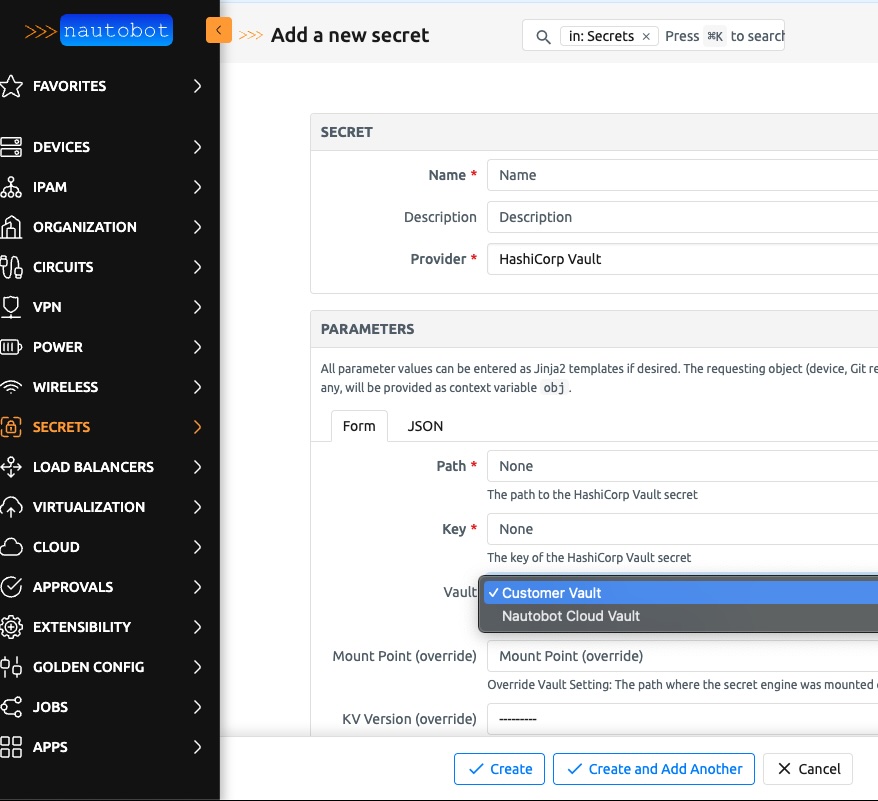
After you update the instance and ensure the Environment Variables are available, you can add your self-hosted Secrets directly into the Nautobot UI. When adding a Secret, you'll see two Vault options (screenshot below). Choose the Customer Vault option, input the correct information for the Secret located on your self-hosted Vault instance, and Nautobot will be able to retrieve it.