Restore & Manage Snapshots
Restore a Snapshot
Restoring replaces an Instance's database with the contents of a Snapshot. You can restore any compatible Snapshot to an Instance — not only Snapshots taken from that same Instance.
- Navigate to Organization Snapshots (or the Snapshots tab on the target instance).
- Click the ellipsis (
...) button on the Snapshot you want to restore and choose Restore. - Select the target Instance and confirm.
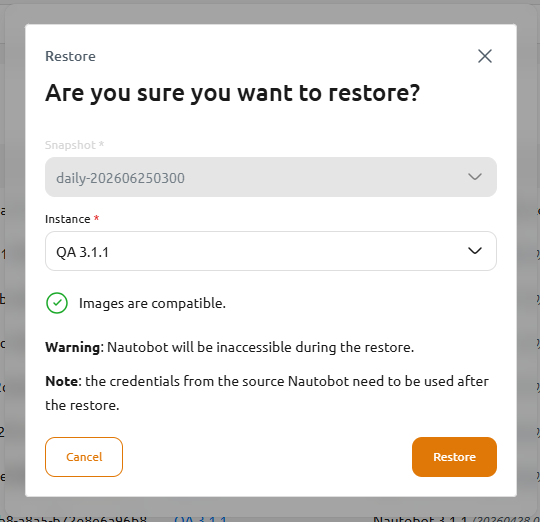
Before the restore runs, the dialog confirms whether the Snapshot and the target Instance's Image are compatible (see Compatibility below).
Restoring overwrites the target Instance's database
A restore replaces all data in the target Instance with the Snapshot's contents, and the Instance is inaccessible while the restore runs. If you might need the current data, take a fresh Snapshot of the target Instance first.
Sign in with the source Instance's credentials after a restore
Because a Snapshot is a full database copy — including user accounts — you sign in to the restored Instance using the credentials from the Snapshot's source Instance, not the target Instance's previous credentials.
Compatibility
For a restore to be allowed, the target Instance's Image must be compatible with the Snapshot's:
- The same Nautobot major version, at the same or a newer version.
- The same set of Apps as the source, each at the same or a newer version (and the same major version).
If the target is missing an App that was installed on the source, is a lower version, or is a different major version, the Console rejects the restore with a compatibility error before it runs, and the target Instance is left unchanged. The simplest way to guarantee compatibility is to create the target Instance from the same Image as the Snapshot's source.
Automatic (Scheduled) Snapshots
In addition to on-demand Snapshots, an Instance can take Snapshots automatically on a schedule. Set the Snapshot Schedule Type on the instance's Basic settings — either when creating the instance or later by editing it:
| Snapshot Schedule Type | Description |
|---|---|
| Disabled | No automatic Snapshots (default). |
| Daily | A Snapshot is taken once per day. |
| Weekly | A Snapshot is taken once per week. |
| Monthly | A Snapshot is taken once per month. |
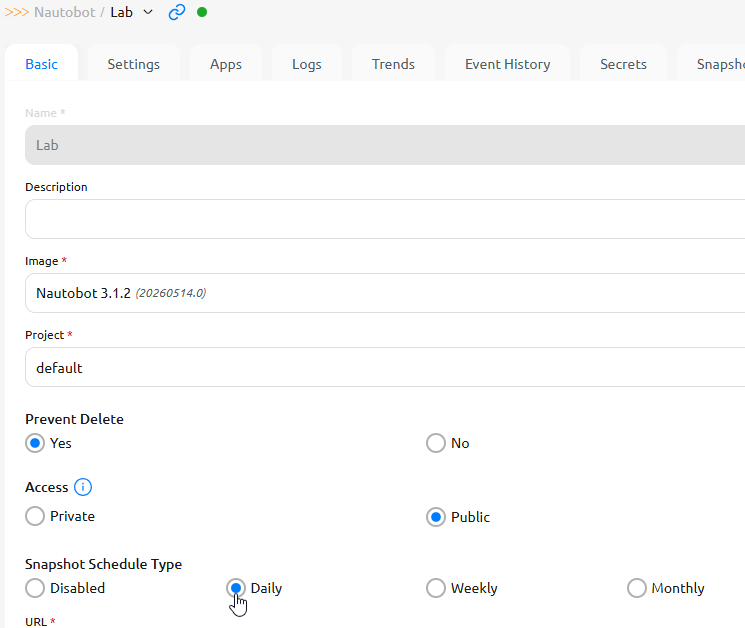
Nautobot Cloud automatically retains the 14 most recent scheduled Snapshots per Instance and prunes older ones. Snapshots you create manually (or upload) are never pruned.
Download a Snapshot
To keep an off-platform copy of your data, download a Snapshot's underlying database backup (a .tar file): open the ellipsis (...) menu on the Snapshot and choose Download.