Declare Pip Dependencies
Pip dependencies are additional public Python packages installed alongside your Nautobot instance. Use them when your Jobs or other customizations need to import a library that isn't already available in your instance.
Dependencies vs. Apps
A pip dependency is a plain Python library (for example pandas or openpyxl). A custom App is a Nautobot App that plugs into Nautobot's app system. If you try to add a package that looks like a Nautobot App here, the Console will suggest you install it from the Apps tab instead.
Pip dependencies are managed from the Customization tab of a Nautobot instance's detail view. Review the requirements and how customization works first.
Add a Dependency
- Open the instance and go to the Customization tab, then select Pip Dependencies.
- Click Add Dependency.
-
Fill in:
Field Description PyPI Package Name The package name as published on PyPI — for example example-dependency. The Console verifies the package exists on PyPI as you type.Version Constraint (Optional) A PEP 440 version specifier such as 1.4.2,>=1.4, or<2.0. Leave blank to install the latest available version.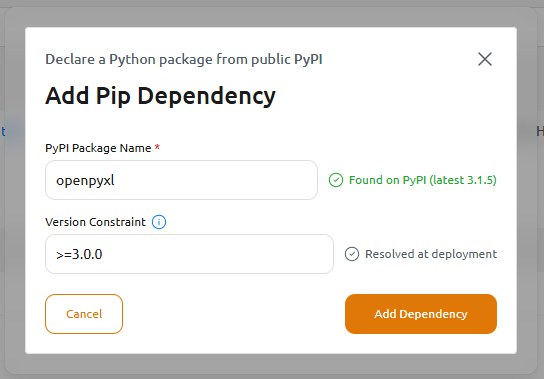
-
Click Add Dependency.
- Update the instance to build and deploy the new image, or continue adding dependencies and Update once at the end. See Applying Your Changes.
View, Edit, and Remove Dependencies
The Pip Dependencies list shows each declared package with its Package name, Version constraint, and the date it was added. For each entry you can:
- Edit Version Constraint — change the version specifier.
- Remove Dependency — remove the package.

Any change here stages a pending update; Update the instance to apply it.
Troubleshooting
- Dependencies are installed when the image is built. If a package name or version can't be resolved, the image build fails: your instance keeps running its previous image and returns to Pending Update.
- The error appears in the instance's Event History: open the failed Build Image event and click See details to read the build log — a
pipresolution conflict shows up here directly. Correct the package name or version constraint, then Update again to retry the build. See Instance States. - Adding many dependencies, or dependencies with conflicting version requirements, can cause
pipresolution to fail during the build. Pin versions you know are compatible with your Nautobot version.