Upgrade Nautobot
In Nautobot Cloud, the Nautobot version — together with its bundled Apps and dependencies — is packaged as an Image. Upgrading Nautobot means pointing your instance at a newer Image and running Update.
Before You Upgrade
- Snapshot first. Take a Snapshot of the instance as a rollback point.
- Test in a lower environment first. On a Development or Staging instance, restore a recent Production Snapshot, then apply the upgrade — this runs the same database migrations against Production data and lets you validate App compatibility before you touch Production. See Environments & Promotion.
Steps
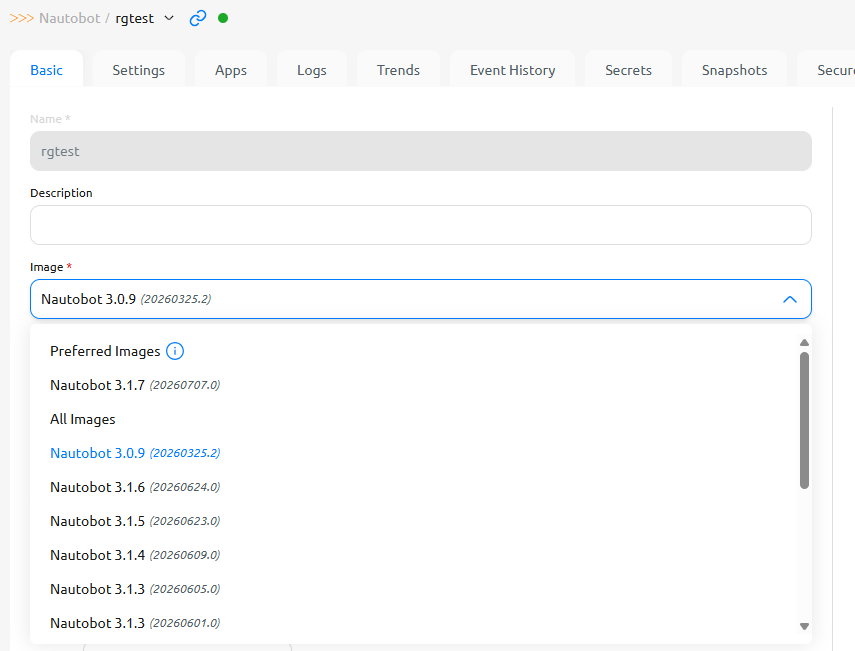
- Browse available Images at Organization Images and note the version you want. Preferred images are the latest release for each major version and image family. Click any Image to see the Nautobot core version and the App versions it bundles.
- Open the instance and change its Image — from the Basic tab (or the Edit action), select the newer Image and Save. See Instance Details.
- Update the instance to roll out the new Image. See Actions.
- When the instance returns to Healthy, sign in and verify.
Apps move with the Image
Apps are bundled into the Image alongside a compatible Nautobot version — you don't upgrade Nautobot core and Apps separately. Moving to a newer Image moves its Apps to the versions that Image bundles. See the Apps FAQ.
Minor/Patch vs. Major Upgrades
- Minor and patch upgrades are self-service — change the Image and Update.
- Major version upgrades (and changes to the set of Apps in an Image) may require a support ticket.
If Something Goes Wrong
- The instance fails to start on the new Image → it moves to Errored. Recover it, or revert the Image and Update again. See Instance States.
- A data or behavioral problem → restore the Snapshot you took before upgrading.
Instances with custom Apps
If your instance has customization (custom Apps, pip dependencies, or static files), upgrading the base Nautobot version builds a new custom image on the newer base — your custom Apps, dependencies, and static files carry over — using the same build-and-update flow described in Customize an Instance.