Chaining Jobs
ChainingJob is a subclass of Nautobot's BaseJob that you can extend to run a dynamically-determined sequence of other Jobs in a single Nautobot Job execution. Subclass it and override workflow() to compose existing Jobs into a higher-level workflow.
When to use it
- You already have small, focused Jobs (e.g.
PingJob,SSHJob) and want to orchestrate them. - A later step needs the output of an earlier step.
- The workflow should either succeed end-to-end or roll back database changes on failure.
- You want a per-step progress display on the Job Result page.
- You want to compose existing chains into larger ones (chains of chains).
If you just need to run one Job, use Job directly. ChainingJob is for sequencing two or more.
Writing a chain
Subclass ChainingJob and implement workflow(self, context). Return (or yield) a dict per step describing the job to run:
from nautobot.apps.jobs import StringVar
from nautobot.dcim.models import Device
from nautobot_tools.job_chaining import ChainingJob
from nautobot_tools.jobs.ping import PingJob
from nautobot_tools.jobs.ssh import SSHJob


class PingThenSSH(ChainingJob):
    target = StringVar(label="Target")

    class Meta:
        name = "Ping then SSH"
        rollback_on_failure = False

    def workflow(self, context):
        target = context["input"]["target"]
        # PingJob takes a target string; SSHJob takes a Device object.
        device = Device.objects.get(primary_ip4__host=target)
        return [
            {"job_class": PingJob, "job_run_kwargs": {"target": target, "count": 4, "ping_interval": 1}},
            {"job_class": SSHJob, "job_run_kwargs": {"device": device}},
        ]
Register it the same way as any other Job (register_jobs(PingThenSSH) in your app).
Warning
A chain does not check permissions on its sub jobs. If a user can run the main chaining Job, it will run every sub job (and any nested chain) on their behalf, regardless of whether they have permission to run those Jobs directly. Only grant permission to run a chain to users who are allowed to run every Job in that chain.
Each step is a dict with the following keys:
| Key | Purpose |
|---|---|
job_class |
Required. A Job subclass to run as this step. |
job_run_kwargs |
Optional. A dict of keyword arguments passed to that job's run(). Defaults to {}. |
step_name |
Optional. Ties the step to a progress bubble (see Showing step progress in the UI). |
The context argument
workflow() receives a dict with two keys:
| Key | Contents |
|---|---|
context["input"] |
The variables the user submitted to the chain (the chain's own StringVar, IntegerVar, etc.). |
context["results"] |
A dict keyed by step index (0, 1, …) holding the return value of each previous step's run(). Populated as the chain progresses. |
Passing output from one step to the next
Use a generator (yield instead of return) so later steps can read earlier results from context["results"]. The results dict is keyed by the step's index (0, 1, …) and each value is whatever that step's run() returned.
For this to work, the child Job must explicitly return something JSON-serializable. Most jobs in this app already do. They return a ToolResult.to_dict() payload with this shape:
{
    "tool_name": "Ping",
    "target": "router-01.example.com",
    "success": True,
    "output": "5 packets transmitted, 5 received, 0% packet loss",
    "metadata": {
        "address": "192.0.2.10",
        "average_latency_ms": 12.4,
        "packet_loss_percent": "0%",
    },
}
Example: Ping Device → Look up the device by IP → Test SSH
PingJob reports the address it actually probed (after any name resolution) in metadata.address. Use that to look up the Nautobot Device and hand it to SSHJob, which takes a device ObjectVar rather than a raw target string:
from nautobot.dcim.models import Device

class PingThenSSH(ChainingJob):
    target = StringVar(label="Target")

    class Meta:
        name = "Ping Then SSH"

    def workflow(self, context):
        target = context["input"]["target"]

        yield {"job_class": PingJob, "job_run_kwargs": {"target": target, "count": 4, "ping_interval": 1}}

        probed_ip = context["results"][0]["metadata"]["address"]
        device = Device.objects.get(primary_ip4__host=probed_ip)

        yield {"job_class": SSHJob, "job_run_kwargs": {"device": device}}
Showing step progress in the UI
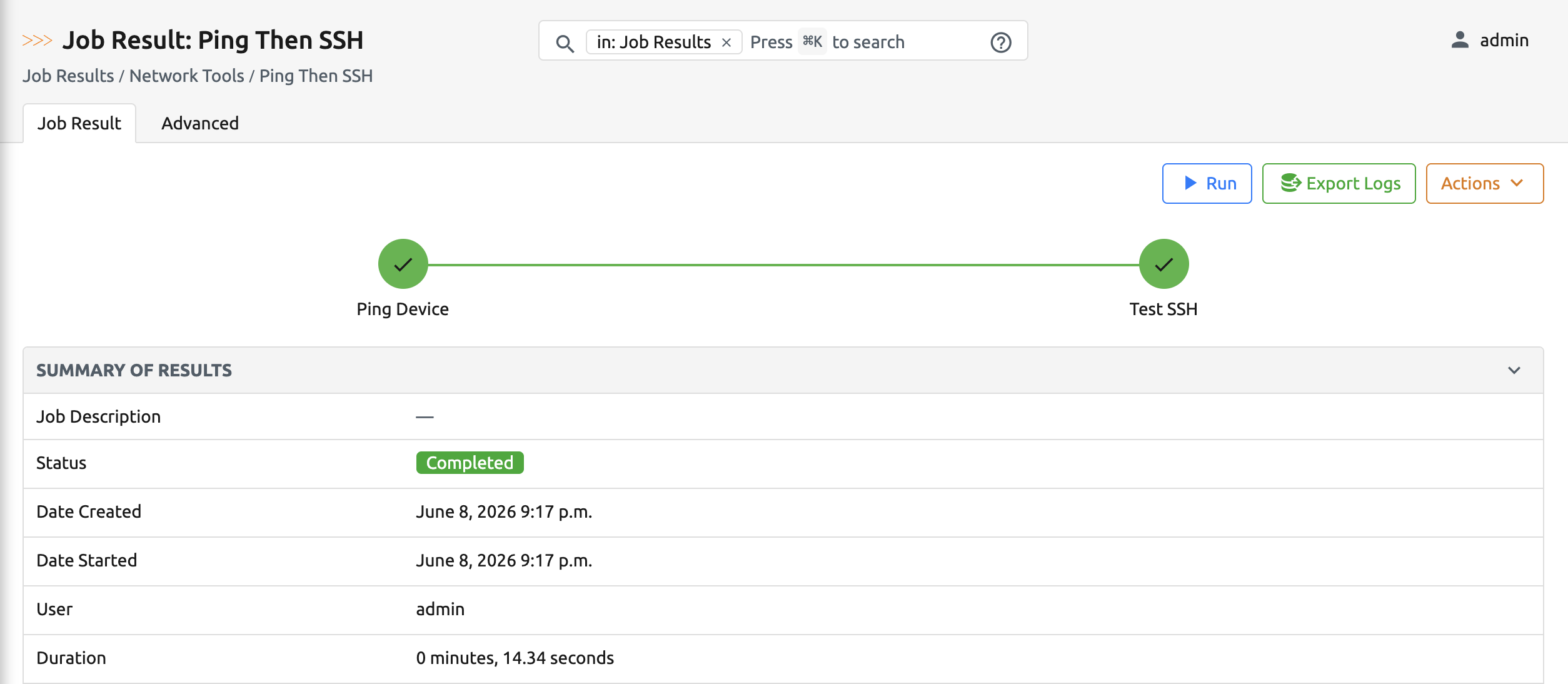
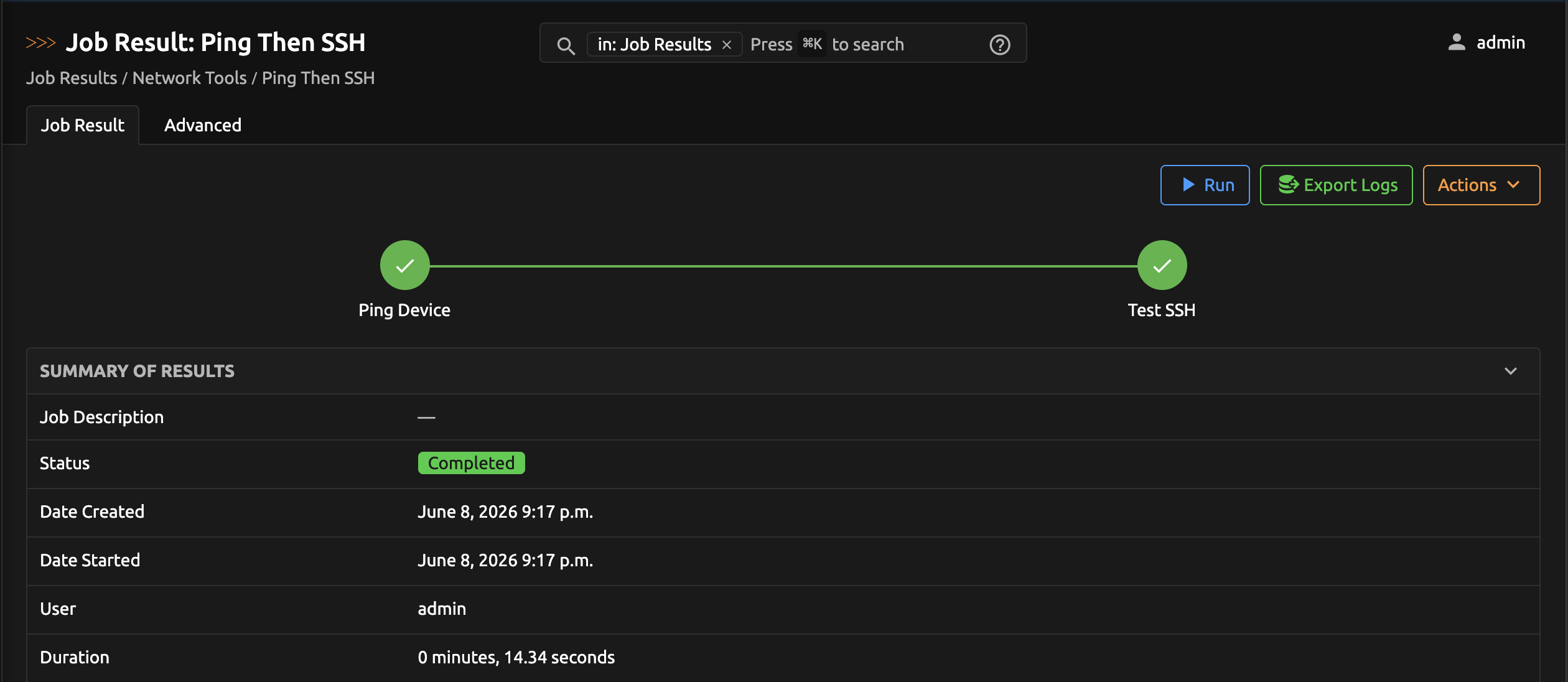
A chain can render a row of live progress bubbles on its Job Result detail page, one per step, so users can see how far the workflow has gotten. This is opt-in and requires two things:
- Declare the ordered step names in
Meta.steps_to_display. - Set a
step_nameon each yielded step dict that matches one of those entries.
class PingThenSSH(ChainingJob):
    target = StringVar(label="Target")

    class Meta:
        name = "Ping Then SSH"
        steps_to_display = ["Ping Device", "Test SSH"]

    def workflow(self, context):
        target = context["input"]["target"]

        yield {"job_class": PingJob, "job_run_kwargs": {"target": target, "count": 4, "ping_interval": 1}, "step_name": "Ping Device"}

        device = Device.objects.get(primary_ip4__host=context["results"][0]["metadata"]["address"])
        yield {"job_class": SSHJob, "job_run_kwargs": {"device": device}, "step_name": "Test SSH"}
As the chain runs, each bubble moves through these states: pending → started → finished (or failure if the step fails).
Notes:
- A step with no
step_name(or a name not listed insteps_to_display) still runs normally. It just doesn't get a bubble. You can mix tracked and untracked steps freely. - Progress is stored in
JobResult.result["job_chain_steps"]and committed on its own database connection, so the bubbles update live even while the chain is mid-run inside arollback_on_failuretransaction. steps_to_displayis optional. Omit it entirely and the chain runs with no progress UI.
Rollback on failure
Set rollback_on_failure = True in Meta to wrap the entire chain in a single transaction.atomic() block. If any step fails, all database writes made by every step in the chain are rolled back:
class CreateAndDeploy(ChainingJob):
    class Meta:
        name = "Create and Deploy"
        rollback_on_failure = True  # all-or-nothing

    def workflow(self, context):
        return [
            {"job_class": CreateRecordsJob},
            {"job_class": DeployJob},  # if this fails, the records above are not persisted
        ]
With rollback_on_failure = False (the default), any writes made before the failing step persist.
Warning
If your chain interacts with anything outside the Nautobot database, you're responsible for undoing those actions yourself.
Setting a custom step status
The chain drives the automatic pending → started → finished/failure transitions for you. When you want to publish a different state for a step yourself, for example marking a step skipped or cancelled, call self.set_step_status() from inside workflow():
| Argument | Purpose |
|---|---|
step_name |
The step to update. Match an entry in Meta.steps_to_display so the bubble renders. |
status |
The status to display for that step. Use a JobChainStepStatusChoices value so the bubble gets a matching icon and color. |
Pass one of the values from JobChainStepStatusChoices (importable from nautobot_tools.choices):
| Value | Meaning |
|---|---|
PENDING |
Not started yet (the initial state of every step). |
STARTED |
Currently running (set automatically when the step begins). |
FINISHED |
Completed successfully (set automatically when the step returns). |
FAILURE |
The step failed (set automatically on error). |
CANCELLED |
The step was cancelled. |
SKIPPED |
The step was skipped. |
A status outside this set still displays as a label, but renders with the default bubble styling (no dedicated icon or color).
from nautobot_tools.choices import JobChainStepStatusChoices
from nautobot_tools.job_chaining import ChainingJob


class ExampleChain(ChainingJob):
    class Meta:
        name = "Example Chain"
        steps_to_display = ["Step A", "Step B", "Step C"]

    def workflow(self, context):
        yield {"job_class": JobA, "step_name": "Step A"}

        # Step B only applies in some cases. When it doesn't, mark it skipped
        # instead of running it, then continue on to Step C.
        if context["results"][0]["needs_step_b"]:
            yield {"job_class": JobB, "step_name": "Step B"}
        else:
            self.set_step_status("Step B", JobChainStepStatusChoices.SKIPPED)

        yield {"job_class": JobC, "step_name": "Step C"}
The update commits immediately on its own database connection, so the bubble reflects the new state live, even mid-run inside a rollback_on_failure transaction.
set_step_status() silently does nothing when:
- the chain declares no
Meta.steps_to_display, or - the chain is nested inside another chain. Because nested chains share the top-level
JobResult, their status writes are suppressed so they don't overwrite the parent's progress (see Nesting chains).
Nesting chains (chains of chains)
A step in a chain can itself be another ChainingJob. This lets you compose larger workflows out of smaller reusable chains:
class ProvisionSite(ChainingJob):
    class Meta:
        name = "Provision Site"
        steps_to_display = ["Onboard Devices", "Validate"]

    def workflow(self, context):
        yield {"job_class": OnboardDevicesChain, "step_name": "Onboard Devices"}  # itself a ChainingJob
        yield {"job_class": ValidateChain, "step_name": "Validate"}               # itself a ChainingJob
A nested chain shares the top-level JobResult, so the framework keeps its bookkeeping isolated automatically:
- The nested chain's own internal step statuses are suppressed. They don't render their own bubbles or overwrite the parent's progress. The parent shows a single bubble for the nested chain step (if you gave it a
step_name). - Each chain's
rollback_on_failuregoverns its own atomic scope. A nested chain withrollback_on_failure = Truerolls back its own steps on failure even if the parent has rollback disabled. Conversely, if an outer chain hasrollback_on_failure = Trueand the workflow ultimately fails, that outer transaction rolls back everything, including writes made by nested chains.
How failure is detected
A step is treated as failed if either:
- Its
run()raises an exception, or - The job instance sets
self._failed = True.
When a step fails, the chain logs the error and re-raises so the surrounding Job machinery records STATUS_FAILURE on the JobResult.