Connecting Nautobot MCP Server to Claude Desktop
This guide walks you through connecting an already-running Nautobot MCP Server to Claude Desktop.
Prerequisites
- Claude Desktop installed (download from claude.ai, see MCP setup guide)
- Node.js installed (required for
npxcommand) - Nautobot MCP Server running and accessible (see Install Guide for setup)
- Your Nautobot API token (each user provides their own)
Configure Claude Desktop
We use mcp-remote as a bridge to translate between the server's HTTP protocol and the stdio interface that Claude Desktop expects. Both streamable-http and sse transports are supported.
Edit your Claude Desktop configuration file:
- macOS:
~/Library/Application Support/Claude/claude_desktop_config.json - Windows:
%APPDATA%\Claude\claude_desktop_config.json - Linux:
~/.config/Claude/claude_desktop_config.json
Add one of the following MCP server configurations based on your Nautobot MCP Server deployment:
Local Development Server (HTTP)
For local use without TLS:
{
  "mcpServers": {
    "Nautobot": {
      "command": "npx",
      "args": [
        "mcp-remote@latest",
        "http://localhost:8000/mcp",
        "--allow-http",
        "--header",
        "Authorization:${AUTH_HEADER}"
      ],
      "env": {
        "AUTH_HEADER": "Bearer YOUR_NAUTOBOT_API_TOKEN"
      }
    }
  }
}
Configuration:
http://localhost:8000/mcp- Direct HTTP access (use/mcpfor streamable-http or/ssefor SSE transport)--allow-http- Required for non-HTTPS connectionsAUTH_HEADER- Set toBearer YOUR_NAUTOBOT_API_TOKENwith your Nautobot API token
Remote Server (Trusted Certificate)
For servers with a publicly trusted or internally trusted TLS certificate:
{
  "mcpServers": {
    "Nautobot": {
      "command": "npx",
      "args": [
        "mcp-remote@latest",
        "https://mcp.yourcompany.com/mcp",
        "--header",
        "Authorization:${AUTH_HEADER}"
      ],
      "env": {
        "AUTH_HEADER": "Bearer YOUR_NAUTOBOT_API_TOKEN"
      }
    }
  }
}
Configuration:
https://mcp.yourcompany.com/mcp- Your server's URL (use/mcpfor streamable-http or/ssefor SSE transport)AUTH_HEADER- Set toBearer YOUR_NAUTOBOT_API_TOKENwith your Nautobot API token
Remote Server (Private CA Certificate)
For servers with a certificate signed by a private or internal CA:
{
  "mcpServers": {
    "Nautobot": {
      "command": "npx",
      "args": [
        "mcp-remote@latest",
        "https://mcp.internal.company.com/mcp",
        "--header",
        "Authorization:${AUTH_HEADER}"
      ],
      "env": {
        "AUTH_HEADER": "Bearer YOUR_NAUTOBOT_API_TOKEN",
        "NODE_TLS_REJECT_UNAUTHORIZED": "0"
      }
    }
  }
}
Configuration:
https://mcp.internal.company.com/mcp- Your server's URL (use/mcpfor streamable-http or/ssefor SSE transport)AUTH_HEADER- Set toBearer YOUR_NAUTOBOT_API_TOKENwith your Nautobot API tokenNODE_TLS_REJECT_UNAUTHORIZED=0- Disables TLS certificate verification- Alternative: Add your CA certificate to the system trust store and remove
NODE_TLS_REJECT_UNAUTHORIZEDfrom theenvsection
Restart Claude Desktop
Close and reopen Claude Desktop. The Nautobot MCP server should now be available.
Verify Connection
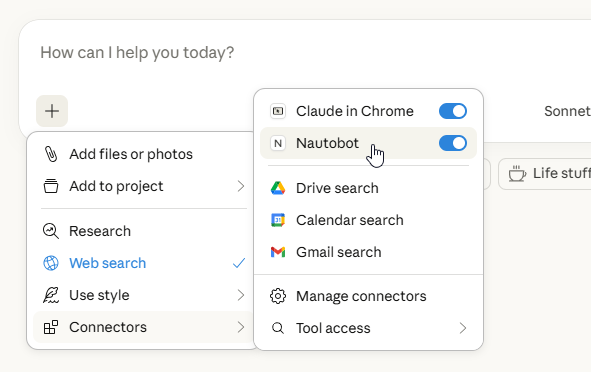
In Claude Desktop, you should see Nautobot listed when clicking the + button in the chat input area then highlighting Connectors.
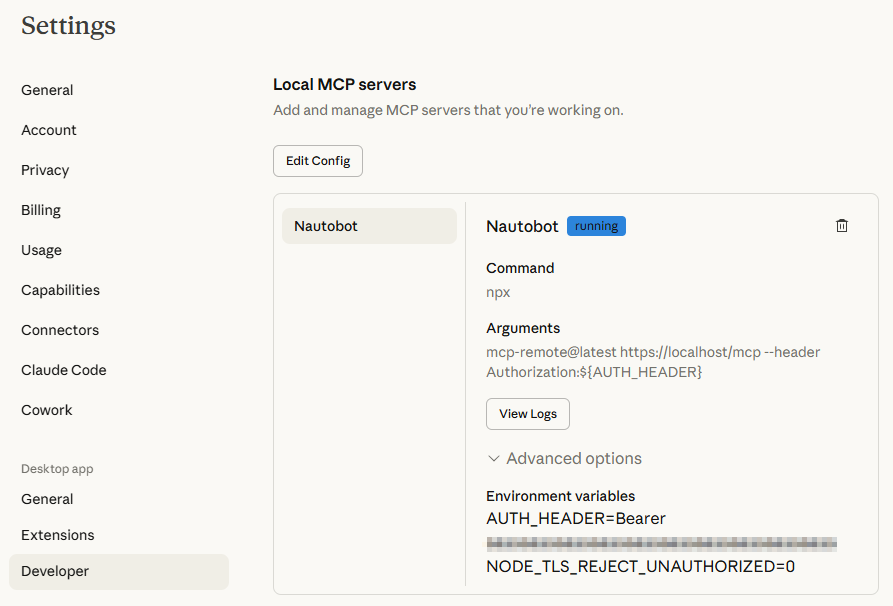
You can also verify by navigating to Settings -> Developer in the desktop app and checking the status of the Nautobot MCP server.
Troubleshooting
Server Not Showing Up or Showing "Failed" in Claude Desktop
- Check Node.js installation - Verify Node.js is installed by running
node --version - Check the configuration file location - Make sure you're editing the correct
claude_desktop_config.json - Validate JSON syntax - Use a JSON validator to ensure your config is valid
- Verify server is running - Check that the Nautobot MCP Server is running and accessible
- Check the endpoint - Ensure the URL ends with
/mcpforstreamable-httptransport or/ssefor SSE transport - Verify your token - An invalid Nautobot API token will prevent successful connection
- Restart Claude Desktop - Completely quit and reopen the application
Why mcp-remote?
Claude Desktop doesn't support direct HTTP streaming protocols - it requires a stdio interface. The mcp-remote package acts as a bridge:
- It connects to your server's endpoint via HTTP
- It provides a stdio interface that Claude Desktop expects
- It translates messages between the two protocols
Windows: Connection Fails with Authorization Header
On Windows, spaces in --header args are split by cmd.exe, breaking the connection. The configurations above use AUTH_HEADER as an env var to work around this - spaces in env vars are handled safely.
Example Usage in Claude Desktop
Once configured, you can ask Claude to query your Nautobot instance:
"Get all active devices in Texas with their names, locations, and device types"
"Show me all interfaces on devices in the NYC location"
"Find the first 10 VLANs with ID between 100 and 200"
"List the primary IP addresses for devices in the production environment, limit to 20 results"
Claude will use the Nautobot MCP Server to query your Nautobot instance.